
Color Master - Color by Number
Coloring Game Studio@RabiGameBoard
4.74.49K Reviews
- Version
- 2.17.17
- Installs
- 5.00M
- Age Rating
- Everyone
Screenshots


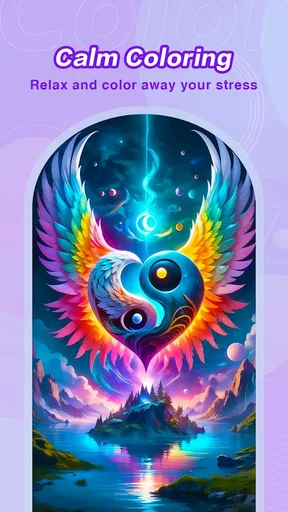


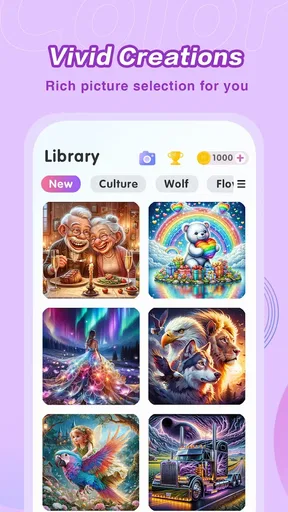
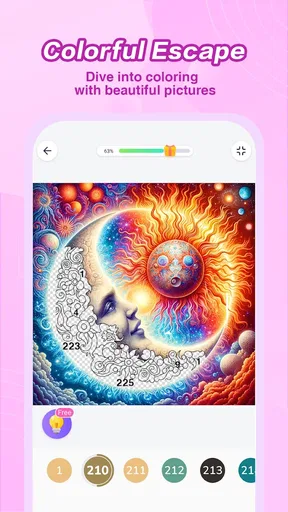
Our Review of Color Master - Color by Number
 Analysis by Appyee
I find Color Master - Color by Number easiest to enjoy when I treat it as a small, low-pressure activity rather than a project I need to finish. The board-game-like rhythm is simple: choose an image, match numbered spaces with colors, and watch the picture take shape. Its appeal is not a demanding challenge or a complicated story; it is having a clear next action whenever I have a few quiet minutes.
Small goals make the first session easy
The opening task is immediately understandable: pick a picture and fill its marked areas. That makes the game approachable even if you have never used a coloring app before. I don’t need to learn a set of rules before starting, and the numbered sections give each session a modest goal: find the current color, fill its spaces, then move on when I’m ready.
That structure works well for brief breaks. I can make a little progress without setting aside a long stretch of time, and there is no pressure to produce an original drawing. The trade-off is that the creative choice is mainly about completing the prepared artwork, not inventing a palette or sketching from scratch. If you want freehand tools, this is the wrong kind of coloring experience.
Progress you can see, with a useful fallback
Coloring by number gives progress a visible shape: empty sections gradually become part of a finished image. I find that satisfying because I can see what my attention has changed, even when I only complete a portion in one sitting. The hint feature is useful when a numbered area is hard to locate, so a moment of searching doesn’t have to turn into a reason to quit.
A practical way to use hints is to save them for the point where you are genuinely stuck, rather than tapping them as soon as a section takes a moment to find. That keeps the small search-and-fill loop intact while still giving you a way through awkward areas. On detailed pictures, though, hints don’t remove the physical difficulty of tapping tiny spaces; zooming can help, but a smaller display may still make careful coloring fiddly.
How the challenge changes as you choose images
The difficulty is largely shaped by the picture you select. A simpler design is a sensible choice when you want a quick, uncomplicated break; an intricate one asks for more concentration and patience. I like being able to choose between those moods, but I wouldn’t assume that every image is equally relaxing. Fine sections can turn a soothing activity into a careful screen-tapping task, especially if you are using the app one-handed or have limited time.
That makes image selection part of the game’s pacing. Before starting, I’d consider whether I have a few spare minutes or want something to settle into for longer. Picking a design that matches the time and attention I actually have is more enjoyable than beginning a very detailed picture while waiting for something and then feeling obliged to finish it.
What keeps the routine going—and what may not
There is a straightforward reason to return: a large gallery gives you another picture to choose when you want the same familiar coloring loop. The reward is mainly the act of filling in the artwork and seeing it completed, rather than a deep strategic system. That simplicity is a strength when I want a calm pastime, but it may not hold the attention of someone who needs escalating competition, complicated unlock goals, or a strong sense of mastery.
The app is free to start, with in-app purchases ranging from $0.49 to $69.99 per item. I’d approach optional spending as a convenience or extra-content choice, not as something needed to understand the basic activity. If you prefer to avoid purchases altogether, it is worth being mindful of any buying prompts and sticking to the options you are comfortable with.
Coloring apps often differ in how much freedom they offer. Compared with a blank-canvas drawing tool, this one is better for people who want guidance and a clear finish line; the numbered regions remove the blank-page problem. Compared with a physical coloring book, it is easier to pick up and put down without preparing materials, but it can’t replace paper and pencils for someone who values the feel of coloring by hand. Those alternatives are better if free expression or a screen-free activity matters more to you.
A good fit for quiet breaks, not every kind of player
I’d recommend it to someone who enjoys visual progress, wants a low-stakes way to occupy a short break, or likes coloring but doesn’t want to decide which color goes where. It can also suit a shared quiet moment: one person can choose the picture while another helps spot the numbered sections, as long as both are happy to take turns with a touch-based activity.
For an everyday example, I might open it while waiting for a kettle to boil, choose a relatively simple picture, and finish a few color groups before getting back to the evening. If I have more time later, I can return to a more involved design. That kind of flexible use is where the game makes sense; it is less suitable when I want a session with a definite competitive endpoint or a demanding puzzle to solve.
It is also a sensible choice for someone who finds freehand drawing intimidating. The image provides the structure, and the numbers make the next step clear. On the other hand, experienced artists may find the fixed design and prescribed colors restrictive. If your main goal is to practise drawing, experiment with custom palettes, or make a picture that is unmistakably your own, a drawing app will serve you better.
Getting Started with Color Master
First things first, downloading Color Master - Color by Number was a breeze. Available for both Android and iOS, it’s just a quick trip to your app store, and you’re ready to go. As soon as you open the app, you're greeted with a user-friendly interface. It’s like the app is gently inviting you to start painting and leave your stress behind.
The setup is seamless. You don’t need to create an account if you don’t want to, which is a nice touch if you’re like me and tired of endless sign-ups. Once inside, there’s a vast gallery of images waiting to be brought to life. From animals and landscapes to abstract designs, the choices are pretty much endless.
How Color Master Works
The app operates on a simple yet addictive principle: color by number. Each image is divided into small sections, each marked with a number. Your job is to fill these sections with the corresponding colors. It’s kind of like a digital jigsaw puzzle, but way more colorful and relaxing.
One of the things I love about Color Master is that it’s super intuitive. You tap on a number and start coloring. If you’re like me and sometimes struggle to find the right section, there’s a handy hint feature that highlights the areas you’ve missed. It’s a lifesaver!
Features That Stand Out
Let’s talk about the features that make this app a standout. First up is the range of images. Whether you're into detailed mandalas or cute animals, there’s something here for everyone. I found myself spending more time than I’d like to admit exploring all the options.
Another highlight is the ability to share your completed masterpieces directly from the app. It’s a fun way to show off your creations to friends and family on social media. Plus, there’s a feature that lets you see a time-lapse of your coloring process. Watching a blank canvas transform into a vibrant image is oddly satisfying.
Why You’ll Love It
So, why should you give Color Master - Color by Number a try? In my opinion, the app is perfect for unwinding after a long day. There’s something incredibly calming about focusing on coloring without worrying about making mistakes. It’s like meditation, but with colors.
Additionally, the app doesn’t bombard you with ads. There are some, of course, but they’re not intrusive. You can also choose to pay for a premium version if you want an ad-free experience, along with some exclusive images. I appreciated having that option, as it feels like the developers respect the user experience.
Room for Improvement
While I’m a fan, there’s always room for improvement. One thing I noticed is that some of the images can be quite intricate, making them a bit challenging to complete on a smaller screen. A zoom feature helps, but it can still be tricky for those with less nimble fingers.
And while the app does offer a decent variety of images, I would love to see more frequent updates with new designs. As someone who can get through these images pretty quickly, fresh content is always welcomed!
At this scale, its appeal becomes clearer. Coloring Game Studio@RabiGame’s board game is made for a gentle, self-paced loop rather than a race against another player. The gallery is presented as a collection of more than 20,000 artworks, and that breadth gives me room to change subjects when I want a different look without changing the basic way I play. Still, a large selection is not the same as a steady stream of new favorites; I’d browse by mood and detail instead of expecting every image to feel fresh or personally appealing.
The game has a 4.7 average from around 47,000 ratings, with about 4,300 written reviews and over 5 million installs. Those figures suggest that many players find the format worthwhile, but they don’t tell me whether its pacing suits a particular person. My own test is simpler: if matching colors to small numbered spaces feels calming, the core loop is likely to work for you; if it feels repetitive after a few pictures, a bigger gallery may not change your mind.
It is free to download, rated for Everyone, and version 2.17.0 requires Android 6.0 or later. The game was released on November 20, 2020. Its cross-device sync can be useful if you sometimes switch devices: before relying on it, I’d make sure I’m using the same account or sync setup on each one and check that recent progress has carried over. That small habit matters most if you tend to color in short sessions and don’t want to lose track of a picture.
One useful way to keep the experience comfortable is to alternate between detailed pictures and simpler ones rather than choosing only the most intricate designs. A detailed image can be rewarding when I want to focus, but it also means more precise taps and a longer commitment. A simpler picture is a better fit for a quick pause. This is not a hidden shortcut so much as a way to match the app’s pace to my attention and screen size.
The time-lapse and sharing options also change how I think about finishing a picture. The time-lapse gives me a quick look at the progression from empty sections to a completed design, while sharing makes a finished image easy to show someone else. I’d treat both as optional extras: if I want a private wind-down, I can simply color and stop; if I enjoy seeing the process or sharing the result, those features add a little more purpose to completion.
As for whether it works offline, I would not make that the deciding reason to install it without checking how the particular session behaves on your device. The reliable expectation is the coloring activity itself; sync and sharing are most useful when a connection is available. If you need a game that you know will work in a no-signal setting, test it before depending on it during travel rather than assuming every part of the experience will be available.
The developer’s name, Coloring Game Studio@RabiGame, is worth recognizing if you are comparing several coloring titles, but I would judge this one by the interaction that matters day to day: whether the numbered areas are comfortable to tap, whether the selected artwork holds your attention, and whether the gallery offers enough variety for your habits. A quick trial with a simple picture and a detailed one will tell you more than browsing the catalog for a long time without coloring.
Overall, Color Master - Color by Number offers a delightful escape into the world of colors. Whether you're looking to relax or just pass the time creatively, this app is worth checking out. So go ahead, download it, and start painting your stress away!
Verdict
Strengths of Color Master - Color by Number
- Vast collection of intricate designs.
- Easy-to-use interface for all ages.
- Offline mode available for convenience.
- Regular updates with new images.
- Encourages creativity and relaxation.
Limitations of Color Master - Color by Number
- Contains ads that can be intrusive.
- Limited features in the free version.
- Requires in-app purchases for premium.
- Color palette can be repetitive.
- Some images may be too complex.
Other Releases by Coloring Game Studio@RabiGame
View All
Pixel Coloring-Color by number
Board4.4

Color Flow - Color by Number
Board4.6
Similar Picks in This Category
View All
Ludo King®
Gametion4.1

Ludo
Yarsa Games4.6

Tile Master® - Matching Game
Higgs Studio3.6

Checkers Online
CC Games4.6

Dominoes
Loop Games4.7

Chess
Chess Prince4.6
Frequently Asked Questions
What is Color Master - Color by Number?
Color Master - Color by Number is a mobile app that allows users to relax and unwind by coloring various images using a number-based system. Each image is divided into sections, each marked with a number that corresponds to a specific color. The app aims to provide a stress-free creative outlet for users of all ages.
Is Color Master - Color by Number free to use?
Yes, Color Master - Color by Number is free to download and use. However, it may include in-app purchases or advertisements. Users can choose to purchase additional content or remove ads to enhance their experience. Always check the app store listing for specific details on any optional purchases.
What devices are compatible with Color Master - Color by Number?
Color Master - Color by Number is compatible with both Android and iOS devices. Ensure your device meets the app’s minimum operating system requirements, as outdated software might not support the latest version of the app. Check the app store for compatibility details and any additional requirements.
Can I use Color Master - Color by Number offline?
Color Master - Color by Number offers some offline functionality, allowing you to color pre-downloaded images without an internet connection. However, accessing new images or certain features might require an internet connection. Ensure you download any desired content beforehand if you plan to use the app offline.
How does Color Master - Color by Number enhance relaxation?
Color Master - Color by Number promotes relaxation by providing a simple, engaging activity that requires minimal decision-making. The structured nature of coloring by numbers helps users focus solely on the task, which can reduce stress and anxiety. It's designed to be a calming way to spend leisure time, promoting mindfulness and creativity.
Play our best games!


